
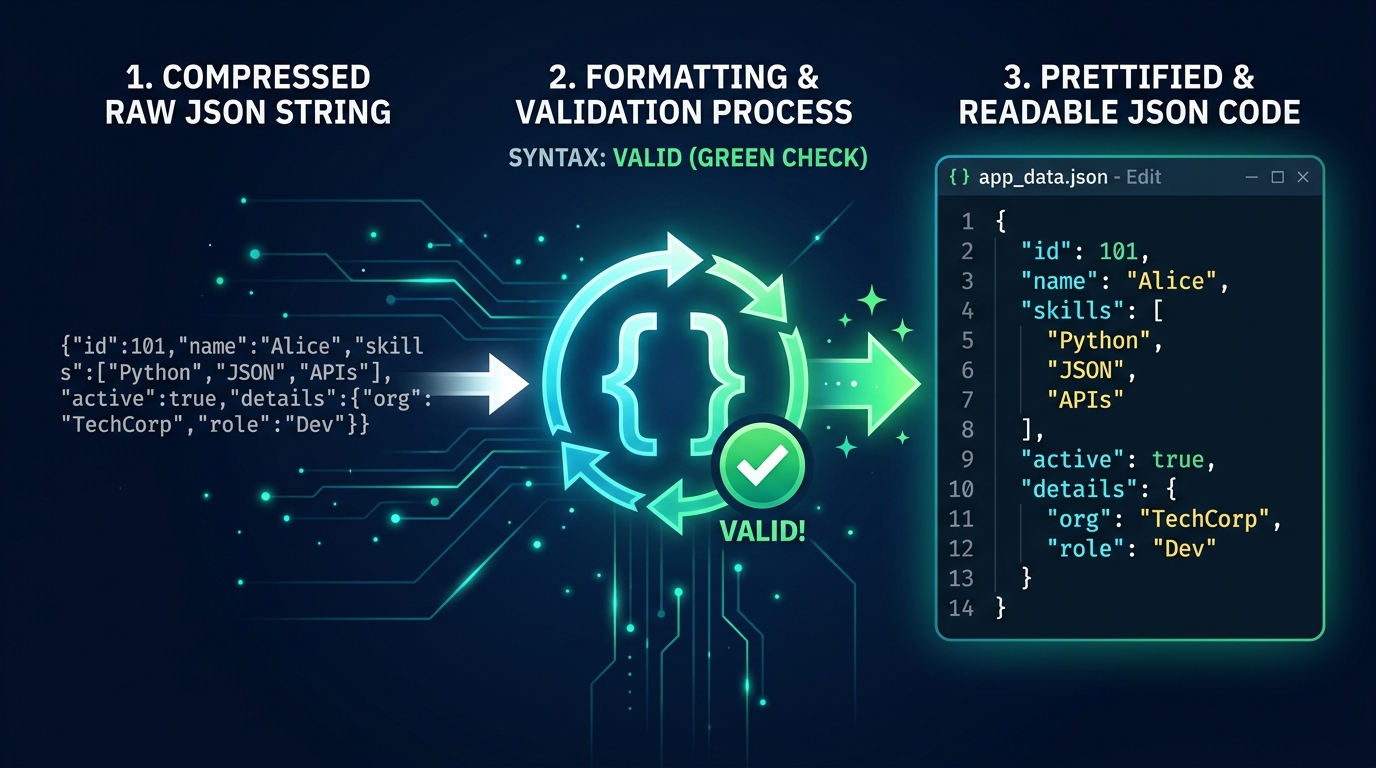
In modern web development, software engineering, cloud computing, and mobile app architecture, JavaScript Object Notation (JSON) is the undisputed standard language of data interchange. Whenever an API delivers user records, a mobile application receives push notifications, or a server loads microservice configuration files, structured data travels across networks formatted as JSON. However, when JSON is transmitted in compact single-line payloads or formatted with chaotic indentation, reading and debugging it by hand becomes painful. Using an online JSON formatter allows developers, students, and API testers to beautify, validate, and minify structured data instantly in their browser.
While these three operations often occur in the same developer tool, they serve distinct purposes. Formatting (beautifying) improves human readability through indentation and line breaks. Validation verifies that the text adheres strictly to official JSON grammar specifications. Minification strips all non-essential whitespace to optimize payload transfer speed.
What Is JSON?
JSON stands for JavaScript Object Notation. Standardized by Douglas Crockford in the early 2000s and formally specified in RFC 8259 and ECMA-404, JSON is a lightweight, language-agnostic, text-based data interchange format. While derived from a subset of JavaScript object literal syntax, JSON is supported natively by virtually every modern programming language, including Python, Java, Go, C#, PHP, Ruby, Rust, and Swift.
Core JSON Data Types
Unlike rich programming languages that support classes, sets, and dates, JSON deliberately restricts its vocabulary to six universal primitive and composite data structures:
- Objects: Unordered collections of zero or more name/value pairs enclosed in curly braces
{}. Every key must be a string in double quotes, followed by a colon and a value. - Arrays: Ordered collections of zero or more values enclosed in square brackets
[], separated by commas. - Strings: Sequences of zero or more Unicode characters enclosed strictly in double quotation marks (
"text"). - Numbers: Double-precision floating-point numbers written in standard decimal or scientific notation (e.g.,
42,3.14159,-17,1.5e10). Leading zeros are not allowed. - Booleans: Strictly lowercase literal values:
trueorfalse. - Null: A lowercase literal
nullrepresenting an empty or absent value.
{
  "name": "Alex",
  "role": "developer",
  "active": true,
  "skills": ["HTML", "CSS", "JavaScript"]
}
In this example, the outer curly braces define a JSON object. The keys "name", "role", "active", and "skills" are wrapped in strict double quotes. The values demonstrate strings, a boolean, and an array.
What Is a JSON Formatter?
A JSON formatter (often called a JSON beautifier or pretty printer) is a software tool that takes raw, unformatted, or minified JSON text and rearranges its visual presentation. It applies consistent indentation (typically 2 or 4 spaces per nesting level), places opening and closing brackets on appropriate lines, and groups key-value pairs predictably.
Why Format JSON?
Modern web APIs routinely compress JSON onto a single unbroken line to save network bandwidth. While computers parse single-line JSON effortlessly, humans find it nearly impossible to inspect deeply nested structures without formatting:
Effortless Hierarchy Inspection
Formatting aligns child objects and nested array elements under their respective parent keys, allowing engineers to visualize database schemas and response payloads at a glance.
Rapid API & Webhook Debugging
When a REST API or webhook returns a 400 Bad Request or unexpected payload, pasting the raw body into a formatter highlights structural anomalies within seconds.
Clear Version Control Diffs
Minified JSON in Git commits causes the entire document to appear as a single modified line. Pretty-printed JSON ensures Git diffs pinpoint the exact line, key, or value that changed.
Professional Documentation
Technical writers and software architects format sample payloads before publishing Swagger/OpenAPI documentation or technical tutorials for developers.
Important rule: Formatting changes only the textual presentation (whitespace, tabs, and line returns). It does not alter the underlying semantic values, data types, or numerical precision represented by the document.
How to Format JSON Online With All in One Toolbox
The All in One Toolbox JSON Formatter is engineered to provide instant, zero-latency parsing, pretty-printing, and minification directly inside your web browser.
Navigate directly to the JSON Formatter tool page. No account, registration, or credit card is ever required.
Paste your API response, configuration snippet, or unformatted text into the “Your JSON” code textarea.
Click the blue Format button. The browser immediately validates the syntax and replaces the raw input with clean, readable 2-space indented JSON.
If the document is valid, the Status card confirms: Formatted — your JSON is valid. If there is a syntax issue, an alert box displays the exact parser error message indicating what went wrong.
Click Copy to copy the formatted code directly to your clipboard, or click Download to save the validated text as a ready-to-use data.json file on your computer.
Unlike many online developer tools that send your text to third-party cloud servers for processing, All in One Toolbox formats and validates your JSON 100% in your local browser runtime using JavaScript’s native JSON.parse engine. Your proprietary API payloads, database dumps, and configuration parameters never leave your computer.
What Is JSON Validation?
In software engineering, the term validation can refer to two very different levels of checking:
| Validation Level | What It Checks | Mechanism Used | Supported by All in One Toolbox? |
|---|---|---|---|
| Syntax Validation | Checks whether the text strictly follows JSON grammar (valid brackets, double quotes, commas, recognized data types). | Browser JSON.parse() parser throwing syntax exceptions. | Yes (Built-in) |
| Schema Validation | Checks whether the data values satisfy defined business constraints (e.g., “email must match regex”, “age must be integer ≥ 18”, “required field missing”). | External JSON Schema validators (Ajv, jsonschema) comparing against a $schema specification. | No (Syntax Only) |
A JSON document can be 100% syntactically valid while still containing broken business logic. For example, {"user_id": -999, "email": "not-an-email"} parses without a single syntax error, yet it will fail when passed into your database or backend payment processing pipeline.
Common JSON Syntax Errors and How to Fix Them
Because JSON is derived from JavaScript, developers frequently carry over lenient JavaScript habits that crash strict JSON parsers. Below are the seven most common syntax errors and how to fix them:
1. Missing Double Quotes Around Keys
In standard JavaScript objects, unquoted keys are perfectly valid. In standard JSON, every key must be wrapped in double quotes.
{
  name: "Alex"
}{
"name": "Alex"
}2. Using Single Quotes for Strings
Python, JavaScript, and Ruby permit single quotes ('text'). JSON strictly forbids single quotes for both keys and string values.
{
  'name': 'Alex'
}{
"name": "Alex"
}3. Trailing Commas After Last Property
Modern ECMAScript allows trailing commas to make git diffs cleaner. Standard JSON strictly forbids trailing commas in both objects and arrays.
{
  "name": "Alex",
  "active": true,
}{
"name": "Alex",
"active": true
}4. Missing Commas Between Properties
Every key-value pair in an object and every element in an array must be separated by a comma.
{
"name": "Alex"
"active": true
}{
"name": "Alex",
"active": true
}5. Capitalized Booleans or Null Literals
In Python, booleans are written True and False, and empty values are None. In JSON, booleans and null must be strictly lowercase: true, false, and null.
{
"active": True,
"data": None
}{
"active": true,
"data": null
}6. Mismatched Brackets or Delimiters
Objects open with { and must close with }. Arrays open with [ and must close with ]. Mixing delimiters causes an instant parser crash.
{
"skills": ["HTML", "CSS"}
]{
"skills": ["HTML", "CSS"]
}7. Comments Inside JSON
Standard RFC 8259 JSON does not support comments of any kind. JavaScript-style // line comments or /* block comments */ will trigger syntax errors in strict parsers. If you need comments in configuration files, consider formats like JSONC, YAML, or TOML.
What Is JSON Minification?
JSON minification is the inverse of formatting. It processes a valid JSON document and removes all non-essential formatting whitespace: indentation spaces, line breaks (\n), and carriage returns (\r), while preserving whitespace located inside string values.
{
  "name": "Alex",
  "active": true
}{"name":"Alex","active":true}In large enterprise systems, minifying multi-megabyte JSON payloads saves 20% to 40% of uncompressed file size. This reduces cloud egress bandwidth bills, lowers HTTP latency, and speeds up parsing on mobile client devices.
Note: Minification is textual whitespace stripping; it is distinct from binary data compression algorithms like Gzip, Brotli, or Zstandard, which can be applied to minified JSON for even smaller wire sizes.
JSON Formatter vs. JSON Validator vs. JSON Minifier
To understand how these developer tools complement each other, review this functional comparison:
| Operation | Main Purpose | Typical Output | What It Does NOT Guarantee |
|---|---|---|---|
| JSON Formatter (Beautifier) | Maximize visual readability and hierarchical clarity for human inspection. | Clean, multi-line indented code with consistent 2 or 4-space tabs. | Does not guarantee business logic correctness or schema compliance. |
| JSON Validator (Syntax) | Confirm that text strictly conforms to RFC 8259 syntax specifications. | Success confirmation or line-numbered parser error message. | Does not check whether required business fields or correct data ranges exist. |
| JSON Minifier | Minimize byte footprint for network transmission and API performance. | Dense single-line JSON string with all structural whitespace stripped. | Does not compress data in the binary sense (like ZIP or Gzip). |
| JSON Schema Validator | Verify that data values conform to specific architectural contracts. | Pass/fail report validating field types, regex patterns, and constraints. | Requires a separately authored JSON Schema document to evaluate against. |
When Is a JSON Formatter Useful?
A fast online formatter is an indispensable tool across dozens of real-world development workflows:
- Debugging Network Requests in DevTools: When inspecting Network tab payloads in Chrome or Firefox, API responses are often dumped as minified blobs. Pasting the payload into a formatter exposes the exact nested error codes immediately.
- Cleaning Up Postman & cURL Responses: Quick terminal runs with cURL often print unformatted JSON. A browser formatter turns chaotic terminal outputs into structured documentation.
- Configuring CI/CD & Modern Frameworks: Package managers (
package.json), linters (tsconfig.json), and cloud workflows frequently break because of a single missing comma. The validator isolates the exact line to fix. - Working with Base64 Encoded Payloads: Many systems encode JSON inside JWT tokens or authentication headers. Once decoded with our Base64 tool, the resulting string can be formatted in the JSON tool for inspection.
- Educational Learning: For students and beginners learning web development, seeing how objects nest inside arrays builds visual intuition faster than reading raw code.
Best Practices for Working With JSON
Following these industry best practices will prevent subtle bugs and keep your data pipelines robust:
1. Always Validate Before Consuming
Never assume external API inputs are well-formed. Always wrap JSON parsing in robust try...catch blocks in JavaScript or equivalent error-handling routines in Python (json.loads()) and Go.
2. Strictly Enforce UTF-8 Encoding
RFC 8259 mandates that JSON exchanged between systems outside a closed ecosystem must be encoded using UTF-8. Avoid legacy encodings like ISO-8859-1 or Windows-1252.
3. Beware of Large Integer Precision Loss
JSON numbers are parsed as double-precision 64-bit IEEE 754 floats in JavaScript. Integers larger than 2^53 - 1 (9,007,199,254,740,991, such as 64-bit database IDs or Twitter snowflake IDs) will lose precision when parsed! Always serialize large 64-bit integers as strings (e.g., "id": "189347892347891234").
4. Protect Sensitive Production Data
Avoid pasting live authentication tokens, credit card numbers, passwords, or production database secrets into random third-party online formatters. While All in One Toolbox executes strictly client-side in your browser, maintaining strict operational hygiene is essential.
Is JSON the Same as a JavaScript Object?
Because JSON syntax looks nearly identical to JavaScript object notation, beginners often assume they are the same thing. In reality, JSON is a text format, whereas a JavaScript object is an in-memory data structure.
| Feature | JSON (RFC 8259) | JavaScript Object Literal |
|---|---|---|
| Nature | Text-based data serialization format. | Executable programming language construct. |
| Key Delimiters | Strictly required double quotes ("key"). | Quotes optional for valid identifiers (key: "value"). |
| String Values | Double quotes only ("hello"). | Single quotes, double quotes, or backticks allowed. |
| Functions / Methods | Not permitted. | Fully permitted (greet() { ... }). |
| Undefined / NaN / Infinity | Not permitted (must use null or omit). | Fully supported in memory. |
| Trailing Commas | Strict syntax error. | Fully supported in modern ECMAScript. |
| Comments | Strict syntax error. | Standard single-line and multi-line comments. |
Sources and Further Reading
This guide adheres strictly to international specifications, official standards bodies, and authoritative documentation:
- IETF RFC 8259: The JavaScript Object Notation (JSON) Data Interchange Format — Internet Engineering Task Force (IETF) official specification governing grammar and parsing.
- ECMA-404 Standard: The JSON Data Interchange Syntax — Ecma International official syntax definition.
- JSON.org: Introducing JSON by Douglas Crockford — The canonical diagrammatic specification of JSON grammar and string escaping rules.
- MDN Web Docs: Mozilla Developer Network: JSON — Complete technical reference for browser-native
JSON.parse()andJSON.stringify()implementations.
Format and Validate Your JSON Online
Tired of unreadable single-line API responses or hunting down missing commas? Use All in One Toolbox’s free online JSON Formatter. Beautify with 2-space indentation, minify for production, copy with one click, and download valid JSON files. Runs 100% locally in your browser for complete data privacy.